3.5 Breadcrumb navigation could be improved (Observation)
3.5.1 Breadcrumb navigation could be improved
Throughout the site, breadcrumbs are used to let users know where they are on the website. This can be helpful for sighted users to understand their current position and the navigation structure of the site.
However, this information is not as evident for screen reader users. The pages are announced simply as a list of links and users are not informed which page they are currently on. They may not realise the purpose of the links as they are not told it is breadcrumb navigation and may assume that these links are part of the page navigation menu.
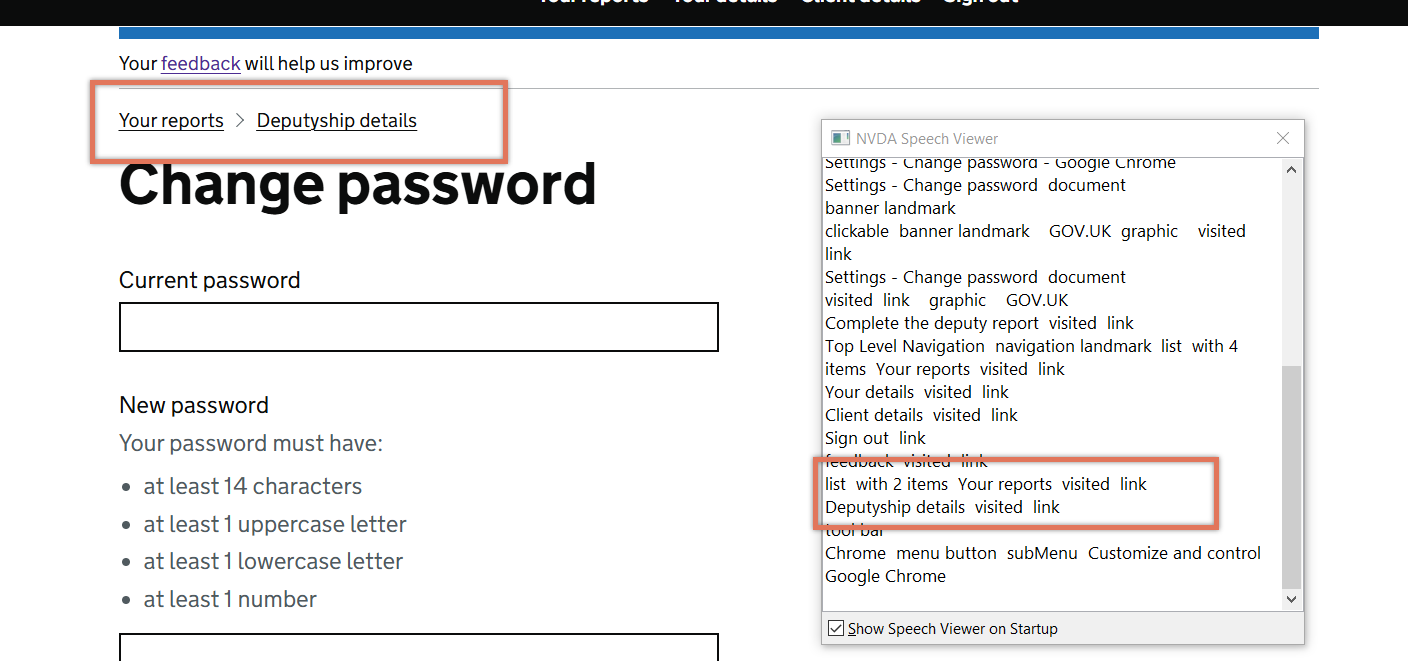
FIGURE 3.9: Breadcrumbs on Change Password page
3.5.2 Recommendation
In its current implementation, it is not clear that these links represent a breadcrumb navigation via screen readers. Despite the current implementation adhering to GDS recommendations, we would suggest refactoring the links to be within a <nav> element as opposed to a <div>.
Label this <nav> element as a breadcrumb using aria-label="Breadcrumb" so that screen reader users are informed of its purpose. In addition, add aria-current="page" to the current page in the breadcrumb so that screen reader users are aware that it is the page they are on.
We also recommend getting in touch with the GOV.UK Design System and flagging this issue.
3.5.3 Resource
3.5.4 Spot Check: February 2026
This issue has not been addressed. Breadcrumbs continue to be presented to screen reader users as an unlabelled list of links, without additional context. Consider making changes as per the original recommendation to explicitly inform screen reader users that the list of links represents breadcrumb navigation, and to identify the current page within the breadcrumb trail.
This remains an ‘Observation’.