2.3 Menu announced as “Top Level Navigation” (Positive)
2.3.1 WCAG 1.3.1 (A), 2.5.3 (A), 4.1.2 (A) - Desktop, Mobile, iPad
On mobile and when browser zoom is applied, the menu navigation links are collapsed within a hamburger menu. This element visually displays the word “Menu”, but screen readers such as NVDA announce it as “Show or hide Top Level Navigation collapsed”. This occurs because the aria-label overrides the button element’s text.
This inconsistency between the visible text and the programmatic label can create confusion, especially for users who rely on both visual and auditory cues to understand functionality.
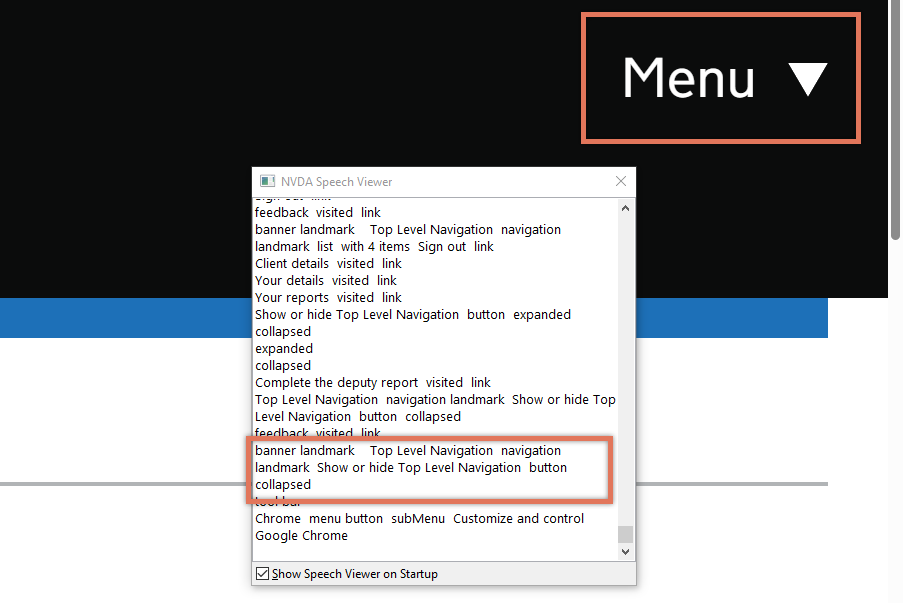
FIGURE 2.5: Menu and NVDA announcement on landing page
2.3.2 Code Snippet
<button type="button" role="button"
 aria-controls="navigation"
aria-label="Show or hide Top Level Navigation" aria-expanded="false">
    Menu
</button>
2.3.3 Recommendation
Remove the aria-label and allow the visible text “Menu” to be used as the accessible name. The visible label is already clear and descriptive enough, and including an aria-label that differs from the visual text creates unnecessary confusion for screen reader and voice control users.
For example:
<button type="button"
 aria-controls="navigation" aria-expanded="false">
    Menu
</button>
2.3.4 Spot Check: February 2026
This issue has been resolved. The links now stack vertically on mobile and when browser zoom is applied instead of collapsing into a hamburger menu, avoiding the need for an expandable button.
This has been updated from a ‘Medium’ severity issue to a ‘Positive’ finding.