3.6 Errors cause completed fields to be deleted (Observation)
3.6.1 Errors cause completed fields to be deleted
On both the Login page and the Change Password page, when a user submits the form with an error, any fields that were correctly completed are cleared upon reload. This includes sensitive fields such as passwords.
For example, on the Change Password page, if the user fails to complete the “New password” field but has correctly entered the current password, submitting the form results in all fields being wiped. This forces users to re-enter information that was already valid, which is especially frustrating and time-consuming for users with cognitive or motor impairments.
This behaviour also poses usability concerns for all users, particularly in cases where strong, complex passwords have been entered but are lost due to a minor error elsewhere on the form.
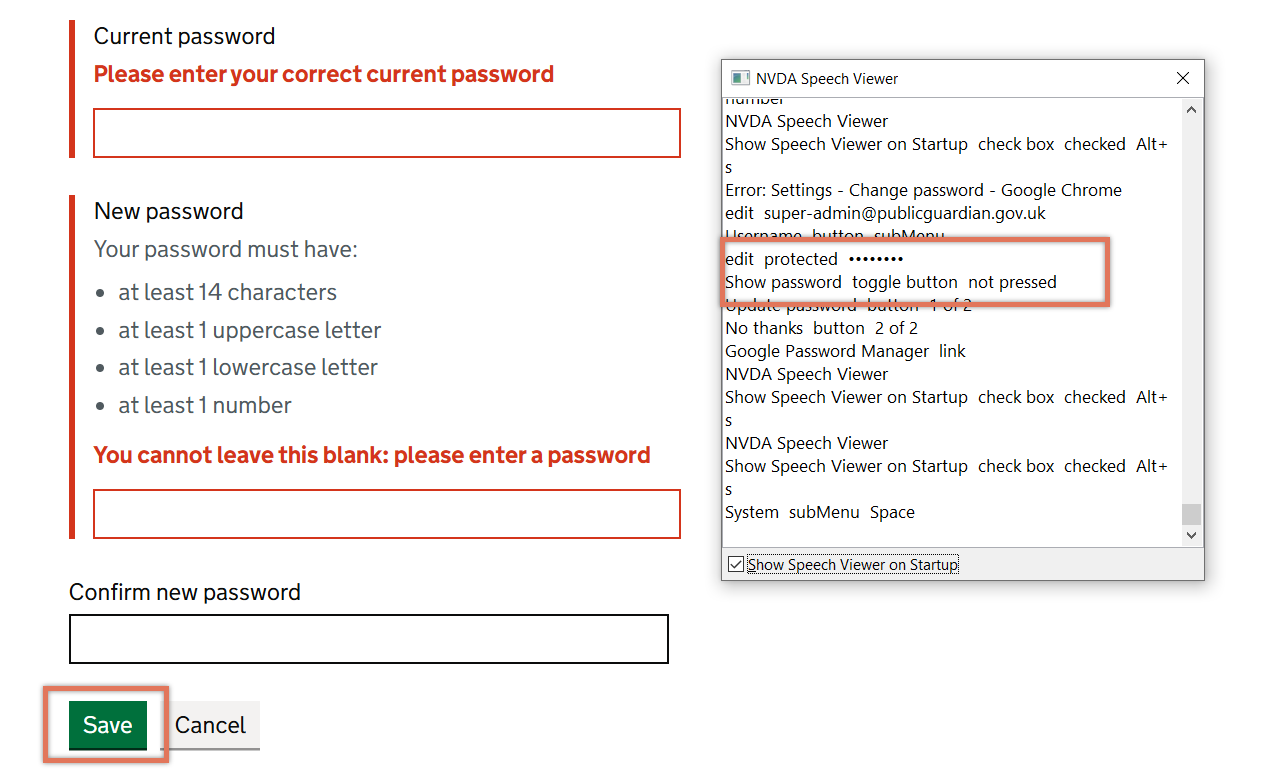
FIGURE 3.10: Input field cleared on password page
3.6.2 Recommendation
Retain correctly entered values after form submission where possible, particularly for non-sensitive fields. For sensitive fields like passwords, consider carefully whether retaining values meets your security requirements, but where feasible, allow them to persist through client-side validation before the form is submitted.
Ensure that error handling does not penalise users by requiring them to retype valid information, and validate inputs in a way that preserves the user’s progress.
3.6.3 Spot Check: February 2026
This issue has not been addressed. Fields on the Login and Change Password pages are still deleted on submitting a form with errors. Consider retaining these values to avoid users needing to re-enter their data.
This remains an ‘Observation’.