3.2 Required and optional fields not clearly or accurately communicated (Medium)
3.2.1 WCAG 1.3.1 (A), 3.3.2 (A), 4.1.2 (A) - Desktop, Mobile, iPad
Across multiple journeys, including the Registration, Edit User Details, and Client Details pages, there are issues with how required and optional form fields are communicated both visually and programmatically.
For sighted users, there is no consistent visual indication of which fields are required and which are optional. The only time users discover a required field is when they attempt to submit the form and receive an error message. This can cause unnecessary form errors, wasted time, and frustration.
For screen reader users, the problem is compounded by the fact that many optional fields are incorrectly coded with the required attribute. For example, the “Alternative phone number” field is optional, yet it is marked as required in the HTML. This results in NVDA announcing it as “edit required blank” when focused, misleading users into thinking it must be completed.
Another example is the address fields that are split across multiple lines. Although only the first line is mandatory, lines two, three, and four are also marked with the required attribute. This means screen readers announce each line as “required,” even though users do not need to enter content into those fields. This can lead users to believe that all lines must be filled in before they can proceed, potentially causing them to enter unnecessary or placeholder information just to avoid perceived validation errors.
These inaccuracies make it harder for users to confidently complete forms and can lead to incorrect assumptions about what information is mandatory.
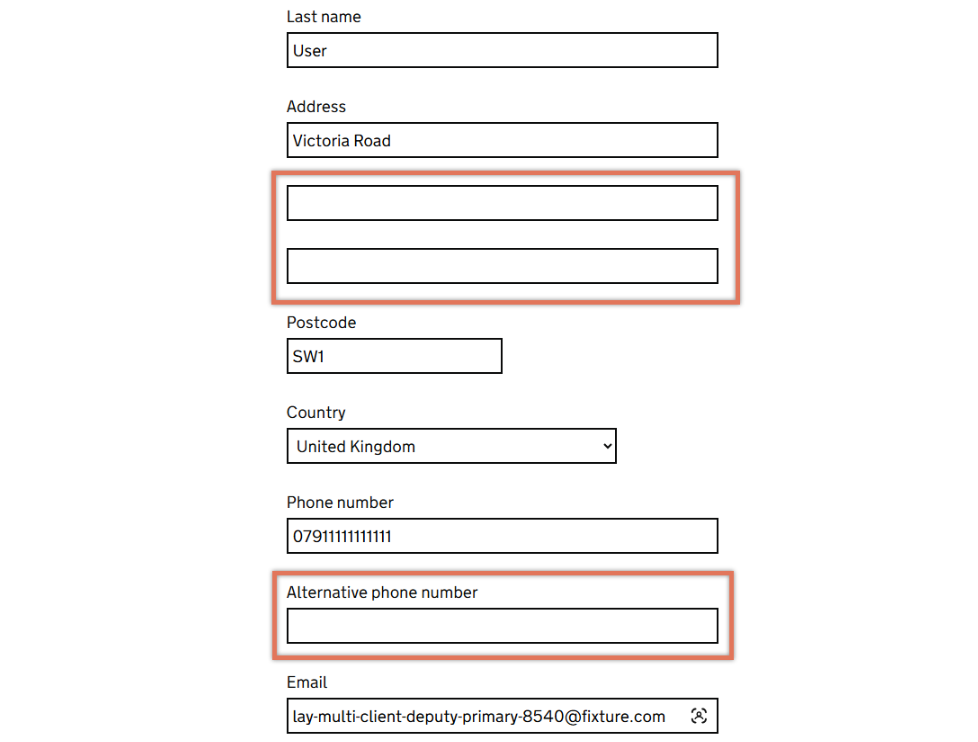
FIGURE 3.2: Optional form fields on Edit User Details page
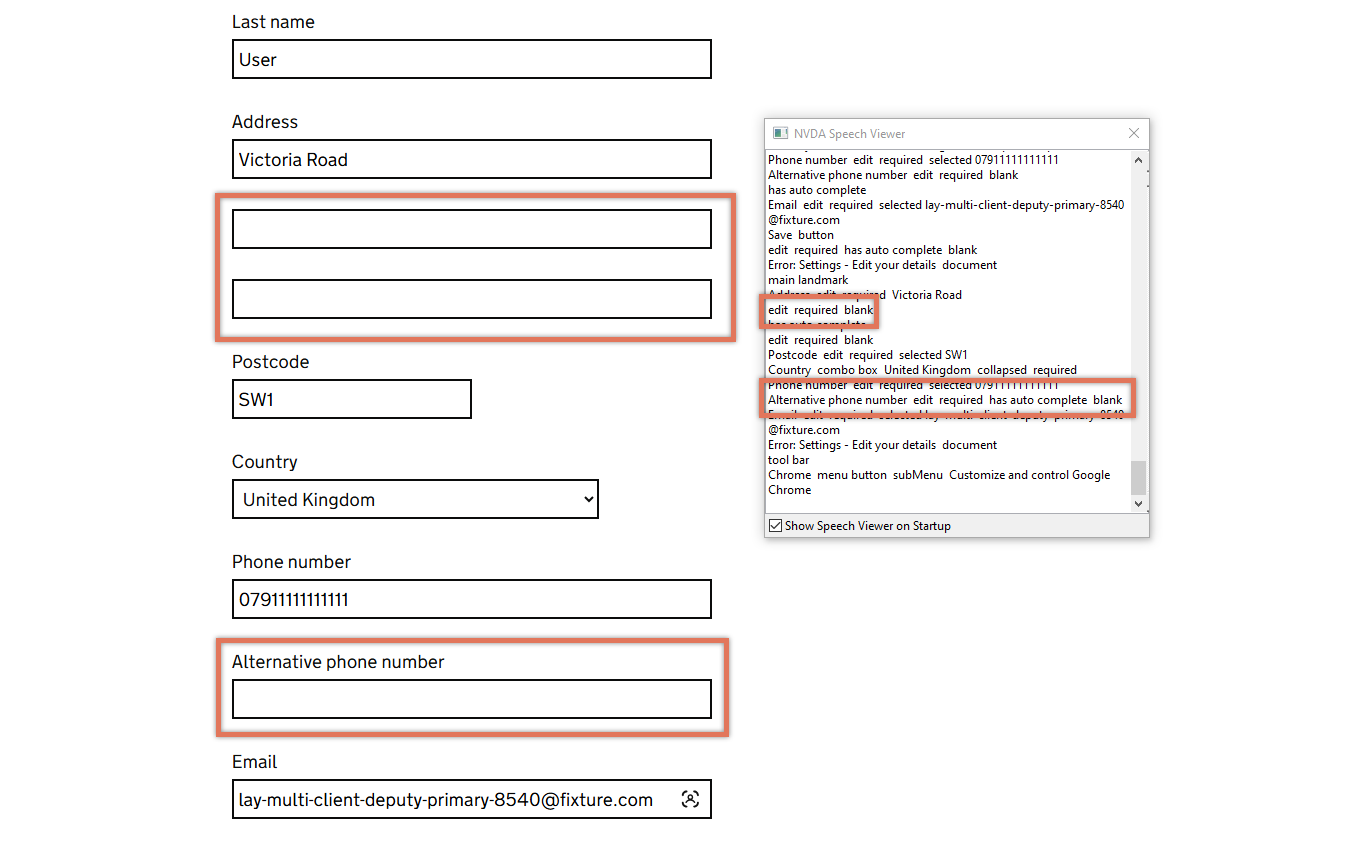
FIGURE 3.3: Optional fields announced as required by NVDA on Your Details page
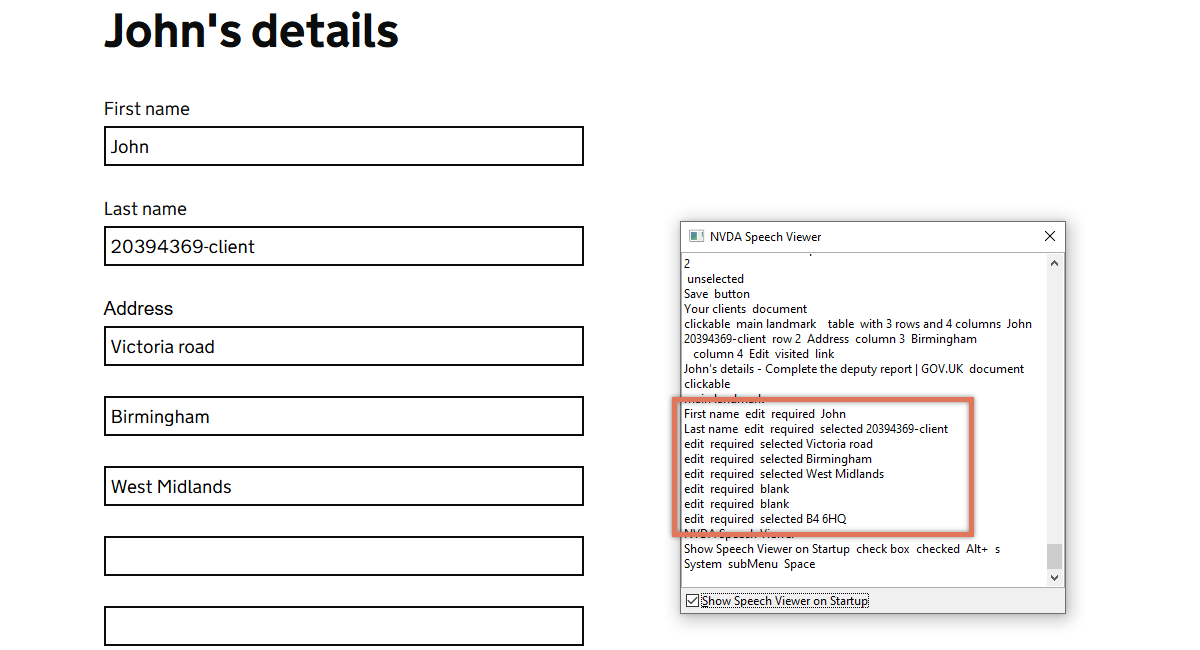
FIGURE 3.4: Optional fields on Client Details page
3.2.2 Code Snippet
<div id="form-group-profile_phoneMain">
  <label for="phoneMain">Phone number</label>
  <input type="text" id="phoneMain" required="required">
</div>

<div id="form-group-profile_phoneAlternative">
  <label for="phoneAlternative">Alternative phone number</label>
  <input type="text" id="phoneAlternative" required="required">
</div>
3.2.3 Recommendation
Ensure that the required/optional status of form fields is communicated accurately and consistently to both visual and screen reader users:
Remove the
requiredattribute from all optional fields so that assistive technologies do not announce them as required.Provide clear visual cues. This could be by marking all optional fields with “(optional)” next to the label, or by adding a note at the top of the form stating “All fields are required unless marked as optional” and marking only the exceptions.
<form>
  <p>All fields are required unless marked as optional.</p>

  <label for="phoneMain">Phone number</label>
  <input type="text" id="phoneMain" required="required">

  <label for="phoneAlternative">
    Alternative phone number (optional)
  </label>
  <input type="text" id="phoneAlternative">
</form>
3.2.4 Resources
3.2.5 Spot Check: February 2026
This issue has not been resolved. Optional fields are still not consistently labelled, and some continue to be announced as required by screen readers, causing confusion.
This remains a ‘Medium’ severity issue.