User Vision logo
  • Spot Check
    • Executive Summary
    • Summary of Findings
    • WCAG 2.2 Overview
      • WCAG 2.2 Compliance
  • Project Background
    • Approach
    • How to use this report
    • Understanding our findings
  • I Findings
  • 1 Positives from previous audit
    • 1.1 Positive: Edit link programmatically linked to context (Positive)
      • 1.1.1 WCAG 1.3.1 (A), 2.4.4 (A) - Desktop, Mobile, iPad
      • 1.1.2 Code Snippet
    • 1.2 Positive: Confirmation required before deleting account (Positive)
      • 1.2.1 WCAG 3.3.4 (AA) - Desktop, Mobile, iPad
  • 2 Resolved Issues
    • 2.1 Screen reader users not informed when password is shown (Positive)
      • 2.1.1 WCAG 1.3.1 (A), 4.1.3 (AA) - Desktop, Mobile, iPad
      • 2.1.2 Code Snippet
      • 2.1.3 Recommendation
      • 2.1.4 Spot Check: February 2026
    • 2.2 Headings not hierarchical or informative section identifiers (Positive)
      • 2.2.1 WCAG 1.3.1 (A) - Desktop, Mobile, iPad
      • 2.2.2 Recommendation
      • 2.2.3 Spot Check: February 2026
    • 2.3 Menu announced as “Top Level Navigation” (Positive)
      • 2.3.1 WCAG 1.3.1 (A), 2.5.3 (A), 4.1.2 (A) - Desktop, Mobile, iPad
      • 2.3.2 Code Snippet
      • 2.3.3 Recommendation
      • 2.3.4 Spot Check: February 2026
    • 2.4 Empty table header on Your Clients page (Positive)
      • 2.4.1 WCAG 1.3.1 (A) - Desktop, Mobile, Automated Finding, iPad
      • 2.4.2 Code Snippet
      • 2.4.3 Recommendation
      • 2.4.4 Spot Check: February 2026
    • 2.5 Fieldset missing legend (Positive)
      • 2.5.1 WCAG 1.3.1 (A), 4.1.2 (A) - Desktop, Mobile, iPad
      • 2.5.2 Code Snippet
      • 2.5.3 Recommendation
      • 2.5.4 Resources
      • 2.5.5 Spot Check: February 2026
    • 2.6 Conditionally revealed radio inputs could be made clearer (Positive)
      • 2.6.1 WCAG 1.3.1 (A), 4.1.2 (A) - Desktop, Mobile, Automated Finding, iPad
      • 2.6.2 Code Snippet
      • 2.6.3 Recommendation
      • 2.6.4 Spot Check: February 2026
    • 2.7 Presentation of radio buttons could be confusing (Positive)
      • 2.7.1 WCAG 1.3.1 (A), 3.3.2 (A), 4.1.2 (A) - Desktop, Mobile, iPad
      • 2.7.2 Recommendation
      • 2.7.3 Spot Check: February 2026
    • 2.8 Conditionally revealed input is not persistent or announced (Positive)
      • 2.8.1 WCAG 1.3.1 (A), 1.3.2 (A), 3.3.1 (A), 3.3.2 (A), 4.1.3 (AA) - Desktop
      • 2.8.2 Recommendation
      • 2.8.3 Spot Check: February 2026
    • 2.9 Typo in page title (Positive)
      • 2.9.1 Typo in page title
      • 2.9.2 Code Snippet
      • 2.9.3 Recommendation
      • 2.9.4 Spot Check: February 2026
    • 2.10 Radio buttons not programmatically linked to the question (Positive)
      • 2.10.1 WCAG 1.3.1 (A) - Desktop, Mobile, iPad
      • 2.10.2 Code Snippet
      • 2.10.3 Recommendation
      • 2.10.4 Resources
      • 2.10.5 Spot Check: February 2026
    • 2.11 Empty or symbol-only table cells not announced clearly by screen readers (Positive)
      • 2.11.1 WCAG 1.3.1 (A) - Desktop, Mobile, iPad
      • 2.11.2 Code Snippet
      • 2.11.3 Recommendation
      • 2.11.4 Spot Check: February 2026
    • 2.12 Default “All Roles” option incorrectly announced as invalid (Positive)
      • 2.12.1 WCAG 1.3.1 (A), 4.1.2 (A) - Desktop, Mobile, iPad
      • 2.12.2 Code Snippet
      • 2.12.3 Recommendation
      • 2.12.4 Spot Check: February 2026
    • 2.13 Tabs do not provide expected keyboard navigation, announcements, or focus management (Positive)
      • 2.13.1 WCAG 1.3.1 (A), 2.4.3 (A), 4.1.2 (A) - Desktop, Mobile, iPad
      • 2.13.2 Code Snippet
      • 2.13.3 Recommendation
      • 2.13.4 Resources
      • 2.13.5 Spot Check: February 2026
    • 2.14 Error summary links do not move focus to the relevant field (Positive)
      • 2.14.1 WCAG 2.4.3 (A), 4.1.2 (A) - Desktop
      • 2.14.2 Code Snippet
      • 2.14.3 Recommendation
      • 2.14.4 Spot Check: February 2026
    • 2.15 Email address field positioned after Save button on Edit User Account page (Positive)
      • 2.15.1 WCAG 1.3.2 (A) - Desktop, Mobile, iPad
      • 2.15.2 Recommendation
      • 2.15.3 Resources
      • 2.15.4 Spot Check: February 2026
  • 3 Unresolved Issues
    • 3.1 Summary answers on Check Your Report page are unclear for screen reader users (High)
      • 3.1.1 WCAG 1.1.1 (A), 1.3.1 (A) - Desktop, Mobile, iPad
      • 3.1.2 Recommendation
      • 3.1.3 Resources
      • 3.1.4 Spot Check: February 2026
      • 3.1.5 Resource
    • 3.2 Required and optional fields not clearly or accurately communicated (Medium)
      • 3.2.1 WCAG 1.3.1 (A), 3.3.2 (A), 4.1.2 (A) - Desktop, Mobile, iPad
      • 3.2.2 Code Snippet
      • 3.2.3 Recommendation
      • 3.2.4 Resources
      • 3.2.5 Spot Check: February 2026
    • 3.3 Edit links not associated with questions (Medium)
      • 3.3.1 WCAG 1.3.1 (A), 2.4.4 (A) - Desktop, Mobile, iPad
      • 3.3.2 Code Snippet
      • 3.3.3 Recommendation
      • 3.3.4 Spot Check: February 2026
    • 3.4 Horizontal scrolling required at higher zoom levels (Medium)
      • 3.4.1 WCAG 1.4.10 (AA) - Desktop, Mobile, iPad
      • 3.4.2 Recommendation
      • 3.4.3 Resources
      • 3.4.4 Spot Check: February 2026
    • 3.5 Breadcrumb navigation could be improved (Observation)
      • 3.5.1 Breadcrumb navigation could be improved
      • 3.5.2 Recommendation
      • 3.5.3 Resource
      • 3.5.4 Spot Check: February 2026
    • 3.6 Errors cause completed fields to be deleted (Observation)
      • 3.6.1 Errors cause completed fields to be deleted
      • 3.6.2 Recommendation
      • 3.6.3 Spot Check: February 2026
    • 3.7 Form fields missing accessible labels (Observation)
      • 3.7.1 Form fields missing accessible labels
      • 3.7.2 Code Snippet
      • 3.7.3 Recommendation
      • 3.7.4 Resources
      • 3.7.5 Spot Check: February 2026
    • 3.8 Status and link could have better programmatic association (Observation)
      • 3.8.1 Status and link could have better programmatic association
      • 3.8.2 Code Snippet
      • 3.8.3 Recommendation
      • 3.8.4 Spot Check: February 2026
    • 3.9 Multiple redundant links on Report Overview (Observation)
      • 3.9.1 Multiple redundant links on Report Overview
      • 3.9.2 Code Snippet
      • 3.9.3 Recommendation
      • 3.9.4 Spot Check: February 2026
    • 3.10 Ensure that PDFs are accessible (Observation)
      • 3.10.1 Ensure that PDFs are accessible
      • 3.10.2 Recommendation
      • 3.10.3 Resources
      • 3.10.4 Spot Check: February 2026
    • 3.11 Error summary does not receive focus on form submission (Observation)
      • 3.11.1 Error summary does not receive focus on form submission
      • 3.11.2 Code Snippet
      • 3.11.3 Recommendation
      • 3.11.4 Resources
      • 3.11.5 Spot Check: February 2026
    • 3.12 Input fields could benefit from validation (Observation)
      • 3.12.1 Input fields could benefit from validation
      • 3.12.2 Recommendation
      • 3.12.3 Resources
      • 3.12.4 Spot Check: February 2026
    • 3.13 File upload status not announced (Observation)
      • 3.13.1 File upload status not announced
      • 3.13.2 Recommendation
      • 3.13.3 Spot Check: February 2026
    • 3.14 Add User link repeated due to placement within table caption (Observation)
      • 3.14.1 Add User link repeated due to placement within table caption
      • 3.14.2 Code Snippet
      • 3.14.3 Recommendation
      • 3.14.4 Spot Check: February 2026
  • 4 New Issues
    • 4.1 Insufficient text contrast on submission tracker (Medium)
      • 4.1.1 WCAG 1.4.3 (AA) - Desktop, Mobile, iPad
      • 4.1.2 Recommendation
      • 4.1.3 Resources
    • 4.2 Screen reader users not informed of completed or current steps in the submission tracker (Medium)
      • 4.2.1 WCAG 1.1.1 (A), 1.3.1 (A) - Desktop, Mobile, iPad
      • 4.2.2 Code Snippet
      • 4.2.3 Recommendation
  • II Recommendations
  • 5 Suggested Next Steps
  • III Appendix
  • Contact Details
  • Prepared by User Vision for the Ministry of Justice

UV3327 [DAT0041] MoJ - Complete the Deputy Report (DigiDeps)

2.14 Error summary links do not move focus to the relevant field (Positive)

2.14.1 WCAG 2.4.3 (A), 4.1.2 (A) - Desktop

On the Add User to Organisation page, when a user clicks a link within the error summary, the focus moves to the surrounding <div> rather than the input field that contains the error.

As a result, users expecting to land directly in the problematic field instead arrive on a non-interactive container. Pressing Tab from there skips the actual field entirely, moving focus to the next form control on the page. This makes it more difficult to correct the error and can lead to incomplete submissions.

This behaviour occurs because the link in the error summary targets the id of the container <div> rather than the id of the input field itself.
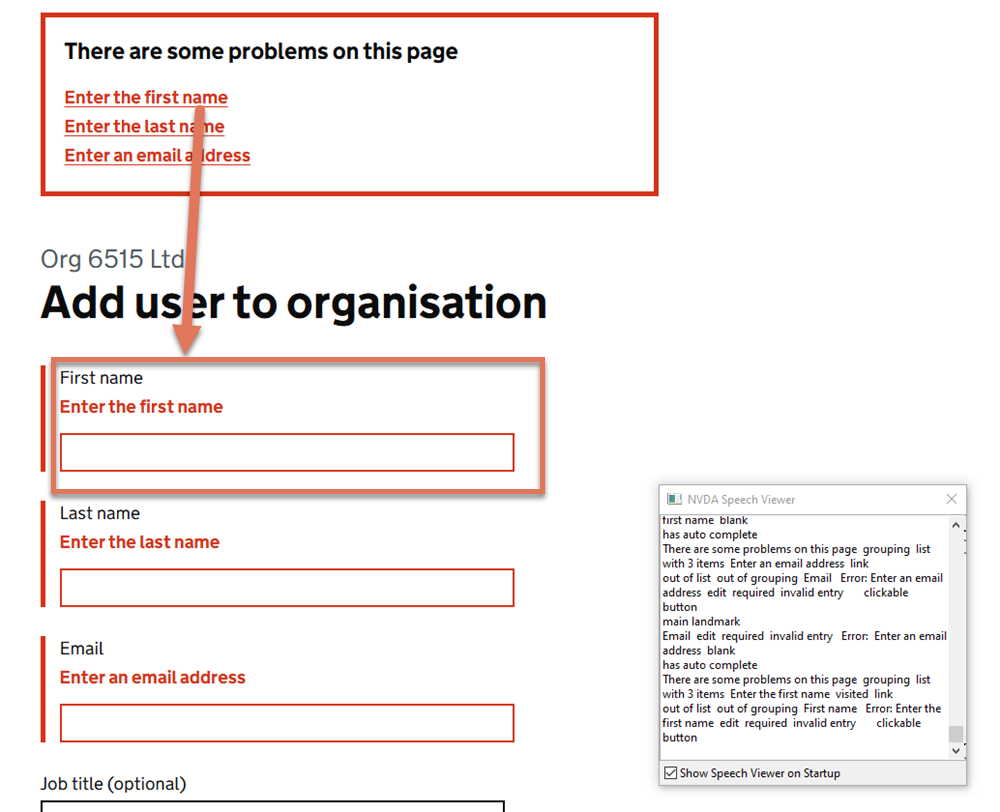
Focus order highlighted on the Add user to Organisation page

FIGURE 2.20: Focus order highlighted on the Add user to Organisation page

2.14.2 Code Snippet


<ul> <li>
<a href="#form-group-organisation_member_firstname">
  Enter the first name
</a>
</li> </ul>
...
<div id="form-group-organisation_member_firstname">
  <input type="text" id="organisation_member_firstname" aria-invalid="true">
</div>

2.14.3 Recommendation

Update the href in the error summary link to point to the id of the actual input field rather than the surrounding container.

Ensure that the inline error message has a unique id and reference it from the input with aria-describedby as is implemented in other parts of the service (in keeping with GDS recommendations).

For example:

<ul><li>
<a href="#organisation_member_firstname">Enter the first name</a>
</li></ul>
...
  <p id="firstname-error">
    <span class="govuk-visually-hidden">Error:</span> Enter the first name
  </p>
<a href="#organisation_member_firstname" aria-invalid="true  
               aria-describedby="firstname-error">
  Enter the first name
</a>

2.14.4 Spot Check: February 2026

This issue has been resolved. Error summary links now move focus to the actual input field with the error.

This has been updated from a ‘Medium’ severity issue to a ‘Positive’ finding.