2.15 Email address field positioned after Save button on Edit User Account page (Positive)
2.15.1 WCAG 1.3.2 (A) - Desktop, Mobile, iPad
On the Edit User Account page, users encounter editable fields such as name, title, and phone number grouped together near the top of the form. However, the option to change the email address is positioned below the Save and Cancel buttons, separating it from the rest of the editable content. This unconventional placement disrupts the expected logical flow of the form.
This may cause confusion for all users, particularly those using screen readers, who might interpret the Save button as the natural end of the form. As a result, they may overlook the email address field entirely, assuming there are no further form elements. This impacts users who rely on predictable and meaningful content sequencing to understand and interact with the page.
Additionally, the styling of the email field differs from the rest of the service’s established patterns. Unlike the typical layout of a label above the input field, this field presents both elements on a single line. Its visual design also slightly differs, reducing consistency and potentially diminishing trust or clarity for users.
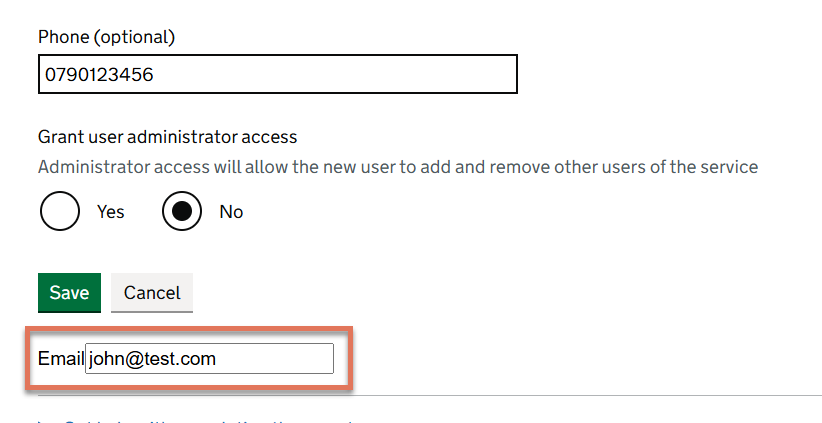
FIGURE 2.21: Email form field highlighted on the Edit User Account page
2.15.2 Recommendation
Reposition the email address field so that it sits logically alongside or directly beneath the other editable fields within the form, ensuring it appears before the Save and Cancel buttons. This would create a more meaningful reading and navigation order, improving accessibility and aligning with user expectations.
Update the styling of the email address field to match the established pattern used throughout the service: label above input, consistent spacing, and input styling.
2.15.3 Resources
2.15.4 Spot Check: February 2026
This issue has been resolved. The email address field now appears below the Last name field within the form, before the action buttons.
This has been updated from a ‘Medium’ severity issue to a ‘Positive’ finding.