2.5 Fieldset missing legend (Positive)
2.5.1 WCAG 1.3.1 (A), 4.1.2 (A) - Desktop, Mobile, iPad
On both the Client Details and Your Details pages, the address section is visually grouped but not semantically structured for assistive technologies. Specifically, Address lines 2–5 are announced by screen readers as unlabelled input fields. This occurs because the associated <label> elements are empty, and the inputs are not grouped using a proper <fieldset> and <legend> combination.
Despite having a visually hidden span element, this has not been programmatically associated with the input field (similar to [Form fields missing accessible labels:::::::::::::: (Observation)]), and is not announced by screen readers when users focus on the input. Also, the text only states “line x of 5” without mentioning that it is related to the address input.
As a result, screen reader users are not informed that the additional lines are still related to the address input. This makes the form harder to understand and complete, particularly for those users navigating by form controls.
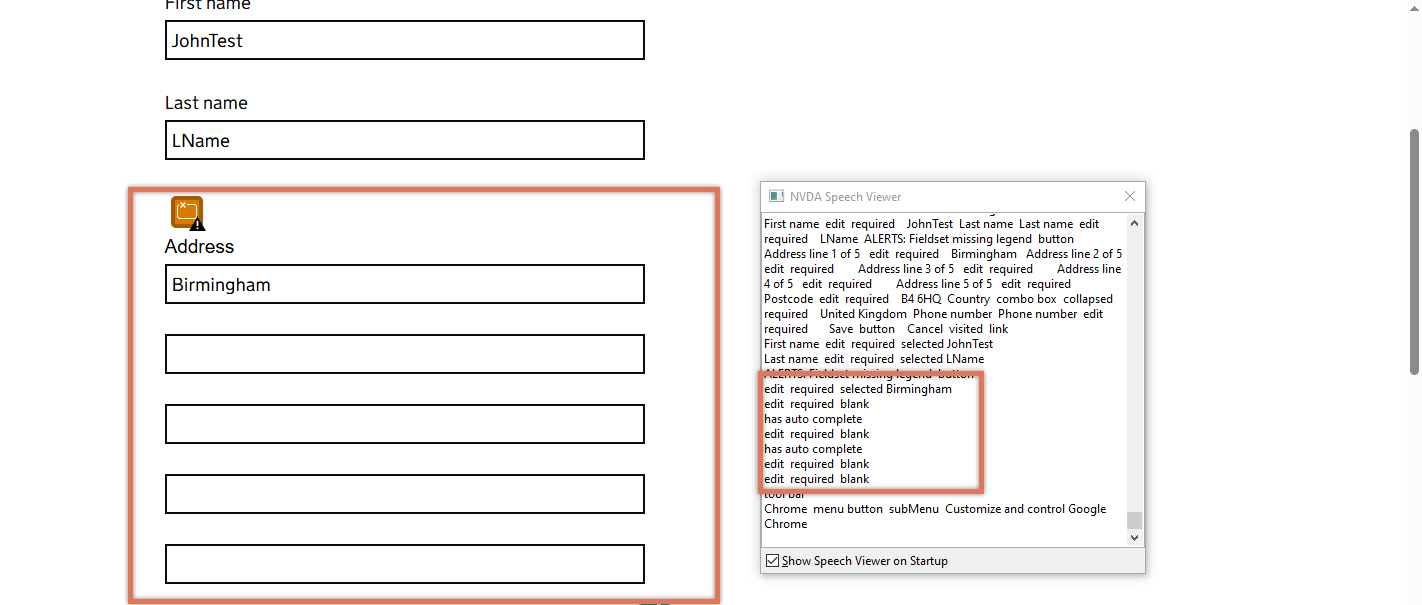
FIGURE 2.8: Address on Client Details page
2.5.2 Code Snippet
<fieldset class="govuk-fieldset">

<div class="govuk-form-group">
    Address<span class="govuk-visually-hidden">line 1 of 5</span>
    <div id="form-group-client_address">
        <label for="client_address" class="govuk-label "></label>
        <input type="text" id="client_address"
name="client[address]" required="required"
 rows="5" aria-describedby="" value="Birmingham">
    </div>
</div>

<div class="govuk-form-group">
    <span class="govuk-visually-hidden">Address line 2 of 5</span>
    <div id="form-group-client_address2">
        <label for="client_address2"></label>
        <input type="text" id="client_address2"
name="client[address2]"
required="required">
    </div>
</div>

<!-- Additional address lines omitted for brevity -->

</fieldset>
2.5.3 Recommendation
Wrap all related address input fields inside a single <fieldset> and include a <legend> element such as “Address” to define the group. Additionally, ensure each input has an associated, meaningful <label> element. If visible labels are not used, then hidden text should be added within the label to give screen reader users the correct context.
For example:
<fieldset class="govuk-fieldset">
    <legend>Address</legend>

    <div class="govuk-form-group">
        <label for="client_address" >Address line 1</label>
        <input type="text" id="client_address" name="client[address]"
value="Birmingham">
    </div>

    <div class="govuk-form-group">
        <label for="client_address2">Address line 2</label>
        <input type="text" id="client_address2"
name="client[address2]">
    </div>

    <!-- Repeat for lines 3–5 -->
</fieldset>
2.5.4 Resources
2.5.5 Spot Check: February 2026
This issue has been resolved. All address-related input fields are now enclosed within a single <fieldset> with an appropriate legend identifying the group as “Address”. Each input has also been assigned a meaningful label (for example, “Address line 1”, “Address line 2”), ensuring that screen reader users receive clear context when navigating through the form controls.
This has been updated from a ‘Medium’ severity issue to a ‘Positive’ finding.