3.10 Ensure that PDFs are accessible (Observation)
3.10.1 Ensure that PDFs are accessible
On the Decisions page, there is a 300-page PDF. PDFs can be challenging to make fully accessible, particularly when created using external software that may not support accessibility tagging and structure. For users relying on assistive technology, navigating PDFs can require adapting settings or working with PDF-specific controls, which may vary significantly from those of standard web pages.
HTML documents are generally a better choice for accessibility, as they are natively compatible with assistive technologies. HTML pages provide a consistent user experience across devices and browsers, with more built-in accessibility features, allowing users to adjust font size, contrast, and other preferences with ease.
Additionally, HTML ensures a seamless experience across desktop and mobile platforms, unlike PDFs, which often open in a new tab on desktops or require download on mobile, potentially disorienting users and disrupting the user journey.
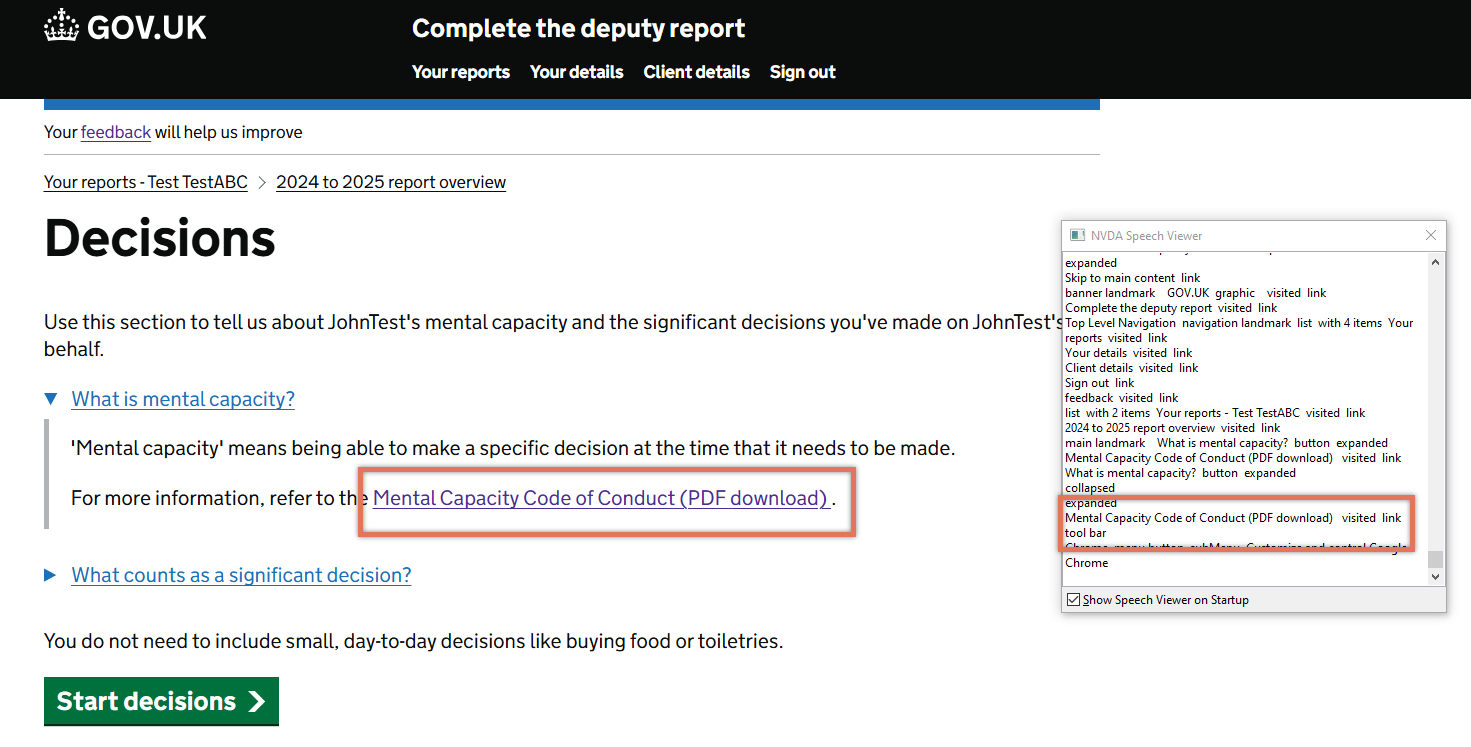
FIGURE 3.15: PDF download link on Decisions page
3.10.2 Recommendation
Consider providing the documents directly on the website as an HTML page. The PDF version can still be offered as a downloadable alternative, but making the HTML version the primary format would improve accessibility and user experience for all users.
If providing a PDF, ensure that this document is accessible by tagging the elements correctly, verifying heading structure, adding accessible alternatives, and reviewing with a screen reader.
3.10.3 Resources
3.10.4 Spot Check: February 2026
This issue has not been addressed. The page still directs users to a PDF and doesn’t provide an accessible alternative.
This remains an ‘Observation’.