2.10 Radio buttons not programmatically linked to the question (Positive)
2.10.1 WCAG 1.3.1 (A) - Desktop, Mobile, iPad
On certain form pages, including the Benefits Check and the Supporting Documents section, radio buttons are not programmatically associated with their corresponding question text. The visible question, such as “Would you like to provide any supporting documents?”, is presented in an <h2> heading, while the <legend> element for the radio group is empty.
As a result, when users navigate to the radio buttons with a screen reader, only the label for the option is announced — for example, “Yes, radio button, one of two” instead of the expected output: “Would you like to provide any supporting documents, grouping, Yes, radio button, not checked, one of two”. This forces users to explore the page manually to discover the question being asked, breaking the logical relationship between the form controls and their purpose.
The issue occurs because the <legend> is empty, meaning the radio group has no programmatic question associated with it. The GDS guidance recommends placing the main question text inside the <legend> of the <fieldset> that contains the related radio inputs. This ensures that the question is always announced together with the options, improving clarity and navigation for screen reader users.
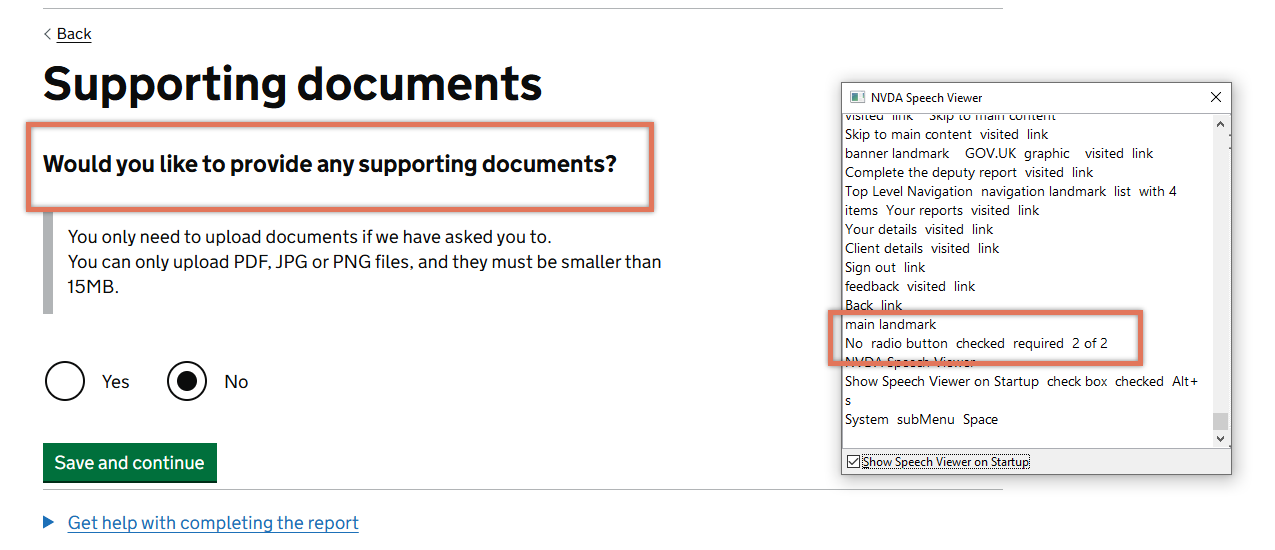
FIGURE 2.15: Radio buttons on Supporting Documents page
2.10.2 Code Snippet
<form name="document" method="post" novalidate>
  <h2>Would you like to provide any supporting documents?</h2>

  <fieldset>
    <legend></legend>
    <div class="govuk-radios govuk-radios--inline">
      <div class="govuk-radios__item">
        <input type="radio" id="document_yes" value="yes">
        <label for="document_yes">Yes</label>
      </div>
      ....
  </fieldset>
</form>
2.10.3 Recommendation
Move the question text into the <legend> element for the radio group, following GDS patterns for fieldset and legend usage. This will ensure assistive technologies announce the question together with the available options.
<fieldset>
  <legend>Would you like to provide any supporting documents?</legend>
  ...
</fieldset>
We also recommend associating any supplementary information to the input field using an aria-describedby. This will ensure that any relevant instructions are announced by screen readers when users focus on the input.
2.10.4 Resources
2.10.5 Spot Check: February 2026
This issue has been resolved. The question text is now correctly associated with the radio group, and it is announced when the radio buttons receive focus.
This has been updated from a ‘Medium’ severity issue to a ‘Positive’ finding.