3.13 File upload status not announced (Observation)
3.13.1 File upload status not announced
On the Upload Documents page in the Supporting Documents section, a confirmation banner appears with the message “Files uploaded – Your uploaded files are now attached to this report and listed below” after a file is successfully uploaded.
While this message is visible on screen, it is not programmatically announced to screen reader users. As a result, users relying on assistive technologies receive no feedback that the file upload was successful, leaving them uncertain whether the action was completed.
This is particularly problematic as the visual change occurs without any focus shift or ARIA notification, so the update is easily missed by users who cannot visually track the change on the page.
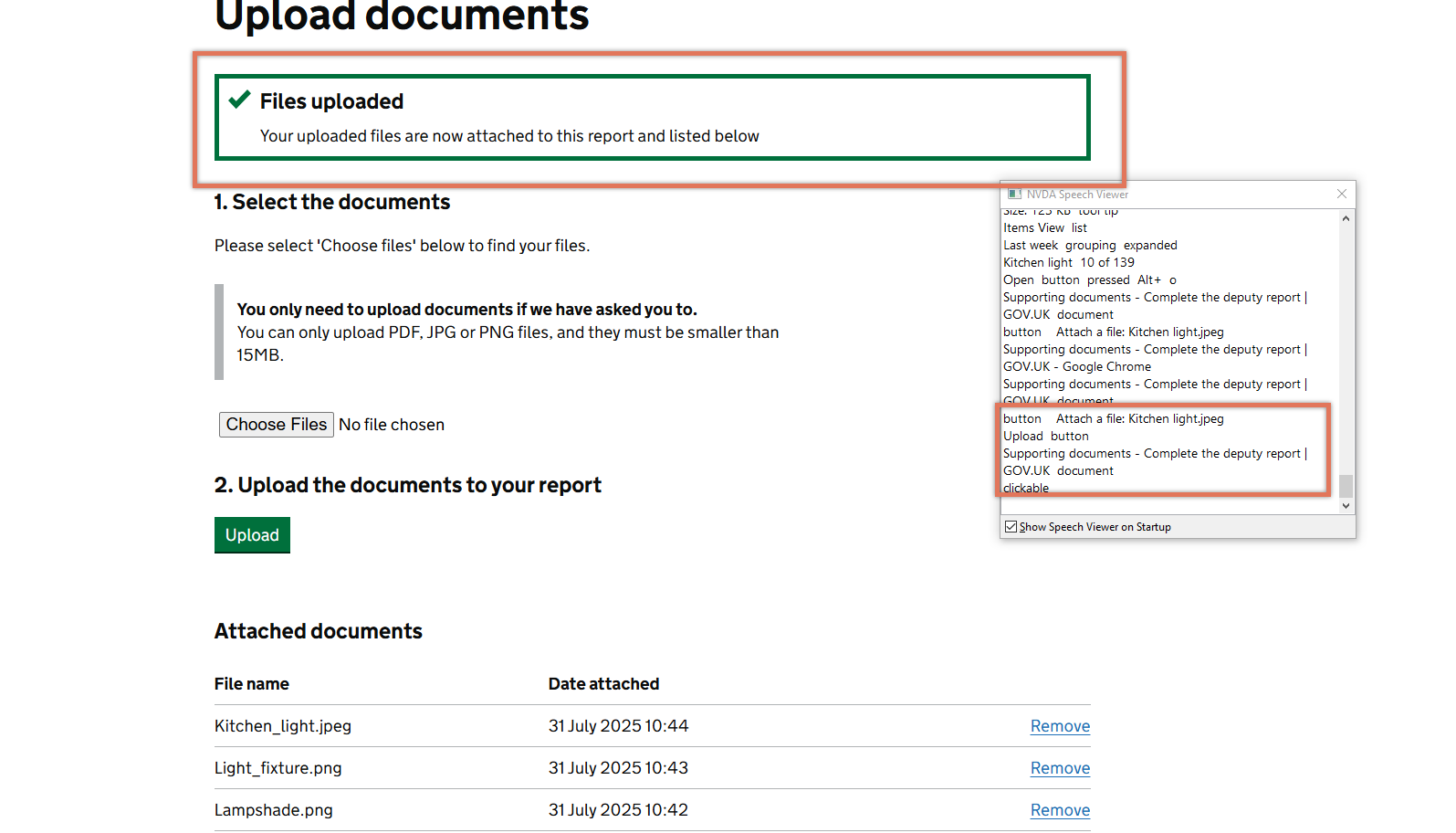
FIGURE 3.21: Files Uploaded banner on Supporting Documents section
3.13.2 Recommendation
Use aria-live="polite" on the container displaying the success message to ensure it is announced by screen readers when it appears. This allows the message to be read without requiring user focus to move.
For example:
<div role="region" aria-live="polite">
    <h2>Files uploaded</h2>
    <p>
        Your uploaded files are now
attached to this report and listed below
    </p>
</div>
3.13.3 Spot Check: February 2026
This issue has been resolved. The page now reloads after uploading a document instead of the content being dynamically updated.
This has been updated from a ‘Medium’ severity issue to a ‘Positive’ finding.